Wildlife Photo Keywords: A Taxonomic Schema That Survives 3,000 Frames
The short answer
Tagging a frame "hawk" is the reason you cannot find it three years later. The pros who run large archives keyword on a taxonomic spine: scientific name, common name, family, and a behavior tag, stacked as a hierarchy (bird, then raptor, then Accipitridae, then Buteo, then Red-tailed Hawk). Build the parent branch once, apply it per species in batch, and 3,000 frames from a trip become searchable by any rank you remember.
You came back from a week in the field with 3,000 frames. Maybe more. Forty species across raptors, waterfowl, songbirds, a couple of mammals that wandered into the long lens. The cards are backed up, the keepers are obvious, and somewhere in that pile is the one shot of a juvenile Cooper's Hawk that an editor will ask for in eighteen months. The question is whether you will be able to find it. (Where each frame was shot is a separate pass: matching a birding trip to a GPX track handles the coordinates. This post is about the words.)
Most photographers solve this the fast way. They tag the keepers "hawk," "bird," maybe "Tucson," and move on. It feels like organization. It is not. Flat wildlife photo keywords like that read fast and retrieve nothing. "Hawk" matches Cooper's, Sharp-shinned, Red-tailed, Harris's, and the Ferruginous you were thrilled to catch, all in one undifferentiated bucket. The tag that took you no time to apply is the tag that gives you no retrieval later.
A note on where this comes from. I build metadata software, and I do not shoot wildlife. The schema below is assembled from how working wildlife and natural-history photographers describe their archives, from the taxonomic infrastructure that ornithologists and biologists already maintain, and from the keyword-catalog standards that the IPTC Photo Metadata Working Group has refined for two decades. The mechanics of writing those keywords into a file are the part I know firsthand.
This post is about one idea: keyword on a taxonomic spine, not a flat pile of common names, and the archive stays searchable no matter which rank you happen to remember.
Why does tagging "hawk" fail you later?
Flat keywording fails for a structural reason, not a discipline reason. A flat tag carries exactly one level of meaning. When you write "hawk," you have recorded the species group and thrown away both the precise species below it and the family above it. Search can only return what you stored, so a flat archive can only answer the exact question you happened to anticipate when you tagged.
Three years on, you do not remember the question you anticipated. You remember fragments. "That accipiter from the Chiricahuas." "The buteo in flight against the snow." "Something in the falcon family, perched." A flat "hawk" tag answers none of those, because none of them say the word "hawk."
A hierarchical keyword stores every level at once. Tag a frame with the chain bird > raptor > Accipitridae > Buteo > Red-tailed Hawk and the photo now answers a search for "bird," for "raptor," for the family "Accipitridae," for the genus "Buteo," and for the exact species, all from the single act of applying that one branch. You stored the whole ladder, so you can re-enter it at any rung.
This is not a niche idea. It is how the largest wildlife archive on earth is built. The Macaulay Library at the Cornell Lab of Ornithology holds media for more than 12,700 species and organizes every asset on a taxonomic structure rather than a flat caption. That structure is exactly why a researcher can pull every recording of a genus in one query. Your personal archive is smaller, but the retrieval problem is identical, and so is the fix.
What goes in a wildlife photo keyword schema?
A pro-grade species keyword has four parts. Each one answers a different retrieval question, and you want all four on the frame.
| Part | Example | Answers the question |
|---|---|---|
| Scientific name (binomial) | Buteo jamaicensis | "What is the unambiguous, language-independent ID?" |
| Common name | Red-tailed Hawk | "What do I and my buyers actually call it?" |
| Family / higher ranks | Accipitridae, raptor, bird | "Show me everything in this group." |
| Behavior or context tag | in-flight, perched, feeding, juvenile | "I need the action shot, not the portrait." |
The scientific name is the anchor because it is the only part that does not drift. Common names change by region and by decade. The American Ornithological Society renamed dozens of birds in its 2024 update, retiring eponymous common names across North America, and that kind of revision happens regularly. A binomial like Buteo jamaicensis survives those changes, which is why archives anchor on it.
The behavior tag is the part flat taggers skip and pros never do. An editor rarely asks for "a Red-tailed Hawk." They ask for "a Red-tailed Hawk in flight, banking, wings spread." Behavior, age class (juvenile, adult), and posture (perched, feeding, in-flight) are the difference between a hit and a near-miss in the buyer's search. They cost three extra words at keywording time and save an hour of scrolling later.
Where these fields actually live in the file
Keywords are not free-floating. They write into specific, standardized metadata fields, and naming them matters because that is what determines whether Lightroom, Bridge, Photo Mechanic, and a stock agency's ingest pipeline all read the same thing.
The flat list of keywords lands in the IPTC Keywords field, mirrored to the XMP dc:subject bag (Dublin Core subject) that modern tools actually read. The hierarchy itself is preserved in lr:hierarchicalSubject, the Adobe XMP namespace that stores the parent-child chain so the tree survives a round trip between catalogs. The IPTC Photo Metadata Standard also defines a controlled SubjectCode field for newsroom subject taxonomies, separate from your free-text keywords. When this post says "write the keyword," that is the field stack underneath it.
How do you build the hierarchy without inventing taxonomy?
The good news: you do not have to invent the tree. Biologists already built it, they maintain it, and it is free. Your job is to inherit it, not author it.
The rank ladder every schema borrows from is the standard Linnaean spine: Kingdom > Phylum > Class > Order > Family > Genus > Species. The iNaturalist taxonomy framework maintains exactly this single tree and its rank system as the reference structure for tens of thousands of organisms. You will not key all the way to Kingdom in practice. For a bird archive, the useful branch usually starts around Class (Aves) or a friendlier informal node ("bird"), descends through Order and Family, and bottoms out at the species.
Three sources give you the names to hang on that ladder, all authoritative and all free:
- The Integrated Taxonomic Information System (ITIS), a partnership of the USGS and the Smithsonian, pairs every common name with its accepted scientific name and a stable Taxonomic Serial Number. It is the cleanest place to confirm a binomial before you commit it to 200 frames.
- The GBIF Backbone Taxonomy unifies dozens of taxonomic checklists into one machine-readable hierarchy, which is the closest thing to a single standard tree your keyword schema can mirror.
- For birds specifically, eBird and the Cornell taxonomy underlying the Macaulay Library cover roughly 96% of the world's bird species with a maintained, current naming structure.
Here is a worked branch for one bird, written as a Lightroom-style hierarchy where > means "parent of":
Animalia > Chordata > Aves > Accipitriformes > Accipitridae > Buteo > Buteo jamaicensis
                                                                          (Red-tailed Hawk)
In practice you collapse the top of that to a working node and keep the bottom precise:
bird > raptor > Accipitridae (hawks, eagles) > Buteo > Red-tailed Hawk [Buteo jamaicensis]
Apply that one branch to a frame and the photo is now retrievable as a bird, a raptor, an accipitrid, a Buteo, and a Red-tailed Hawk, in one gesture.
Should you tag conservation status too?
If you sell to editorial, conservation, or NGO buyers, yes, and it is a one-word add. Picture editors at conservation outlets routinely filter by threat level, and a frame tagged with its status surfaces in those searches when an untagged frame does not.
The controlled vocabulary for this is the IUCN Red List, which classifies species as Least Concern (LC), Near Threatened (NT), Vulnerable (VU), Endangered (EN), or Critically Endangered (CR). Add the status as its own keyword branch (status > Endangered) so it filters independently of the species tree. A Vulnerable species in your archive becomes findable as "every Vulnerable species I have shot," which is precisely the query a conservation editor runs.
One discipline note that the pros are firm on: do not guess the binomial or the status. The North American Nature Photography Association's ethical field practices treat accurate identification and honest captioning as a baseline obligation, not a nicety. If you are not certain a bird is a Cooper's versus a Sharp-shinned, tag it to the genus (Accipiter) and stop there. A correct genus tag beats a confident wrong species tag every time, in your archive and in a buyer's.
How do you apply this across 3,000 frames without dying?
This is where the schema either pays off or collapses. A beautiful taxonomy is worthless if applying it takes a week. The trick is that you almost never tag a single frame. Wildlife shooting produces runs: forty frames of the same Red-tailed Hawk on the same perch, then a burst of it launching. You tag the run, not the frame.
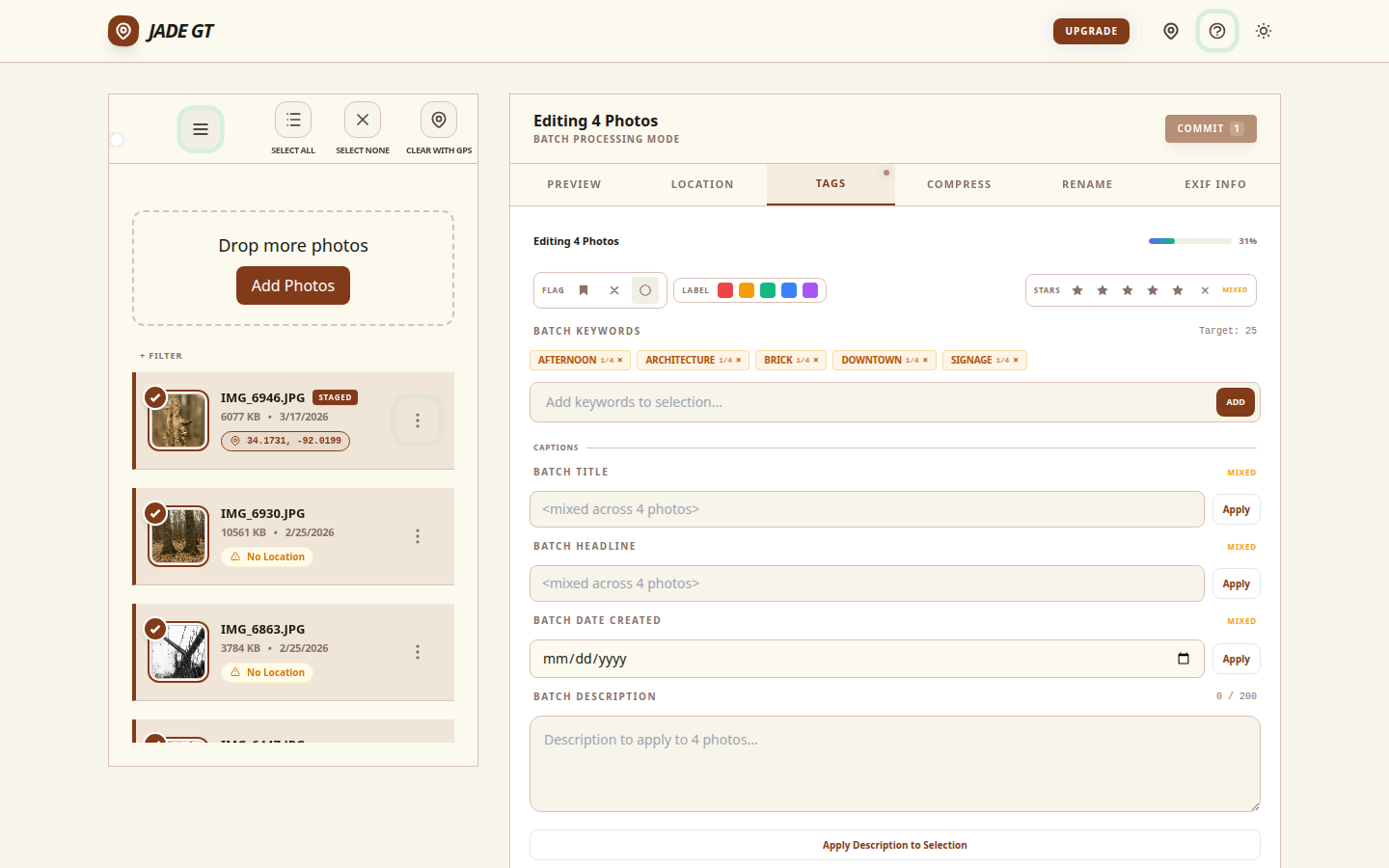
The workflow the pros describe, and the one Jade GT is built around, is batch by species, the same batch-metadata pass that turns a card of unsorted frames into a filterable catalog before Lightroom opens:
1. Cull to the species, then select the run
Sort or filter your take down to the frames of one species. In a burst-heavy wildlife archive this is usually contiguous: you shot that Cooper's Hawk for ninety seconds straight, so it is ninety seconds of adjacent frames. Select the whole run.
2. Build the branch once, reuse it forever
The first time you tag a Red-tailed Hawk, you build the full hierarchy: bird > raptor > Accipitridae > Buteo > Red-tailed Hawk [Buteo jamaicensis]. Save it. Lightroom Classic stores hierarchical keywords as reusable parent-child sets in the Keyword List, and David Riecks' Controlled Vocabulary Keyword Catalog ships more than 11,000 IPTC-compatible terms if you want a pre-built tree to start from. The branch is one-time work. Every future Red-tailed Hawk inherits it with one click.
3. Apply the species branch to the whole run in one pass
Select the run, apply the saved branch, done. Then add the behavior tag that distinguishes this run from the next (the perched run gets perched, the launch burst gets in-flight). PetaPixel's walkthrough of building a Lightroom keyword hierarchy shows the parent-child mechanics in detail if you have never nested keywords before.
4. Confirm the export setting that makes inheritance real
This is the step that quietly breaks archives. A hierarchical keyword only travels with the file if the parent terms are written into the exported metadata. In Lightroom that is the "Export Containing Keywords" behavior; if it is off, your buyer receives "Red-tailed Hawk" with no "raptor" or "bird" above it, and your careful tree is gone the moment the file leaves your catalog. Jade GT writes the full hierarchy into lr:hierarchicalSubject and flattens every parent into IPTC Keywords and XMP dc:subject by default, so the tree survives the handoff to a stock agency or a client without a setting to remember.
For 3,000 frames across forty species, the math is forty branches built (most of them reused from prior trips after your first season) and forty batch-applies. An afternoon, not a week, and the resulting archive answers questions you have not thought of yet.
What this looks like written into the file
Once the pass is done, a single keeper frame of that hawk carries a stack like this in its metadata, all of it written locally into the file on your disk:
- IPTC
Keywords/ XMPdc:subject:bird; raptor; Accipitridae; Buteo; Red-tailed Hawk; Buteo jamaicensis; in-flight; juvenile; Least Concern - XMP
lr:hierarchicalSubject:bird|raptor|Accipitridae|Buteo|Red-tailed Hawk - IPTC
Locationand EXIFGPSLatitude/GPSLongitude: where you actually stood, if you geotagged the take
That frame is now findable by family, genus, species, behavior, conservation status, and location. The juvenile Cooper's Hawk an editor asks for in eighteen months is one filter away, not one afternoon of scrolling away.
Try it on one species
Pick the run from your last trip where you nailed a single species, twenty or thirty frames of the same bird. Drop them into Jade GT, build the taxonomic branch once, add a behavior tag, and apply it to the whole run. Then search your archive for the family. If every frame of that species comes back from a search you did not explicitly tag for, the schema is working.
FAQ
Do hierarchical keywords survive when I export to a stock agency or hand a client the files?
Only if the parent terms are written into the exported metadata. The hierarchy lives in the XMP lr:hierarchicalSubject field, but every parent must also be flattened into IPTC Keywords and XMP dc:subject for tools that do not read the Adobe namespace. In Lightroom that depends on the "Export Containing Keywords" setting. Jade GT flattens every parent by default, so a buyer who searches "raptor" still finds a frame you only clicked once as "Red-tailed Hawk."
What if I cannot identify the species with certainty?
Tag to the highest rank you are sure of and stop. If you know it is an accipiter but not which one, tag the genus Accipiter and the family Accipitridae, and leave the species off. The NANPA ethical field practices treat honest identification as a baseline obligation, and a correct genus tag is more useful in your archive than a confident wrong binomial.
Does this only work for birds?
No. Birds are the clearest example because the taxonomy is so well maintained, but the same spine works for mammals, reptiles, insects, and marine life. You inherit the family and genus from ITIS or GBIF the same way; only the branch names change.
Sources
- iNaturalist Taxon Frameworks. the single global taxonomic tree and Kingdom-to-Species rank system a keyword schema inherits from.
- Integrated Taxonomic Information System (ITIS). USGS/Smithsonian partnership providing stable Taxonomic Serial Numbers and accepted common-and-scientific name pairings.
- GBIF: What is GBIF? (Backbone Taxonomy). unifies dozens of taxonomic sources into one machine-readable hierarchy for keyword inheritance.
- IUCN Red List of Threatened Species. the authoritative source for conservation-status tags (LC, NT, VU, EN, CR).
- Macaulay Library, Cornell Lab of Ornithology. the world's largest wildlife media archive, taxonomically structured, covering roughly 96% of bird species.
- Adobe: Use keywords in Lightroom Classic. official hierarchical keyword documentation, parent-child sets, and Export Containing Keywords behavior.
- Controlled Vocabulary Keyword Catalog (David Riecks). 11,000-plus IPTC-compatible terms from a co-lead of the IPTC Photo Metadata Working Group.
- IPTC Photo Metadata Standard. defines the Keywords and SubjectCode fields hierarchical schemas write into.
- PetaPixel: How to Craft a Lightroom Keyword Hierarchy. applied walkthrough of nesting parent-child keywords in Lightroom.
- NANPA: Principles of Ethical Field Practices. grounds accurate identification and honest captioning as a baseline obligation.
- American Ornithological Society: English Bird Names Project. the 2024 program retiring eponymous common names, illustrating why archives anchor on the binomial.
Shoot a segment I do not cover here, reptiles, insects, marine life? The schema is the same spine; only the family branch changes. Reply or email and the next version covers your taxa.

Reply to Kenny
Questions, corrections, or a workflow story of your own? Send a note. It goes straight to my inbox.